Dear Friend,
Hoctor's place really great..now, he shared how to reword the comment line at the end of each post in index pages to say "Leave a comment here", along with the number of comments.
Here is the result of what he shared: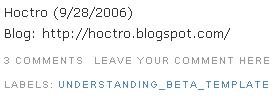
and the "1 comments" bug: VIEW MORE HOW TO INSTALL IT
Monday, October 02, 2006
A Quick Fix: Making it Clearer on Where to Post a Comment
0
comments
Leave your comment here

Tweaking the New Blogger: Adding Vertical Tabs to Your Blog
Dear Friend,
Hoctor's place shared something really great...
this is what he shared:
This is soooo exciting! I'm happy to tell you we have another great help from our friend, The Exploding Boy yet again! Yesterday by luck I came across his vertical tab designs. These are indeed very good looking and professional designs. The first thing came to my mind was, of course, downloading and examining the code to see if I could re-use the horizontal tab hack to use for both vertical and horizontal cases.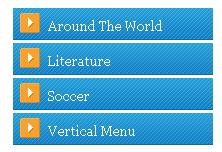

My initial thought was true, that a list is a list, and that it doesn't know if it is a vertical or a horizontal bar! Therefore, to change from horizontal to vertical, we just have to add the appropriate CSS code, then change the tab name, and you'll have vertical tabs!
0
comments
Leave your comment here
Tweaking The New Blogger: Labels as Navigation Tabs
Dear Friend,
Continuing on maximizing the usage of Beta's new Label feature, this time hoctro's place will show you how to turn Labels into Navigation Tabs.
The Yahoo! Design Pattern Library identifies the Navigation Tabs pattern as "the" solution when the site has only some few main categories with their titles shorts and predictable, etc. A prime, everyday-use example for us, as you might have guessed, is no other than Blogger's (classic and beta) navigation tabs!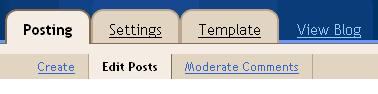
Based on an online example from that pattern's description, I was succeeded in turning our labels into similar navigation tabs:
As you can see, the prominent advantage of this tab over my first "horizontal tab" hack is the clear indication of what the user is seeing, with the active tab in light grey color, and the sub-label in bold.
VIEW MORE
0
comments
Leave your comment here
Subscribe to:
Posts (Atom)
